Services with Image cards
Show the experience behind a session, with the price, duration, and booking action over the service photo.
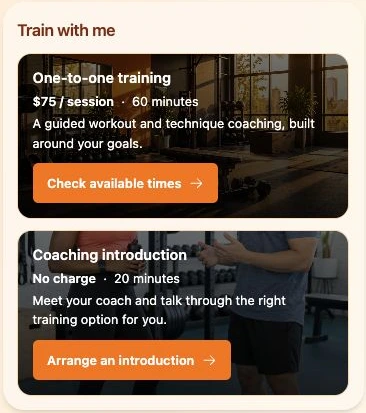
Turn a profile visit into a clearer decision. Show your services, products, and special offers with descriptions, prices, and links to the places where customers can book, buy, or get in touch.

From introduction to interest
Someone likes your work. Their next questions are practical: What can I book? What does it cost? Where can I buy it?
The What you offer block brings those answers together. Give each service or product a name, a description, and optional price text. Services can also show a duration. Add an action link when there is a next step.
Keep a treatment menu beside your portfolio, a print beside your photography, or a consultation beside your introduction. Visitors can explore the details before following your link.
Ideas for your business
See how services, products, downloads, and seasonal packages look in QRown’s four layouts. These examples show the What you offer block with sample content.
Show the experience behind a session, with the price, duration, and booking action over the service photo.
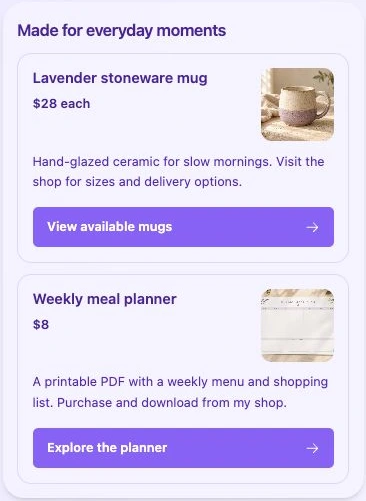
Give each item its own image, description, price, and full-width action button leading to your shop.
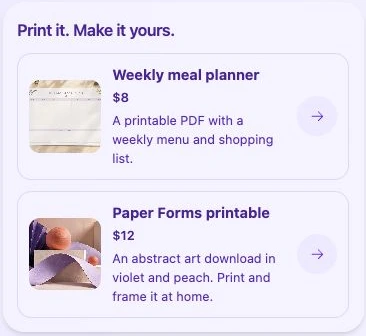
Use compact rows to introduce digital products, with a thumbnail and an action that opens the purchase or download page.
Present a workshop and a seasonal product in a simple list. Keep the package details current and hide an item when the offer ends.
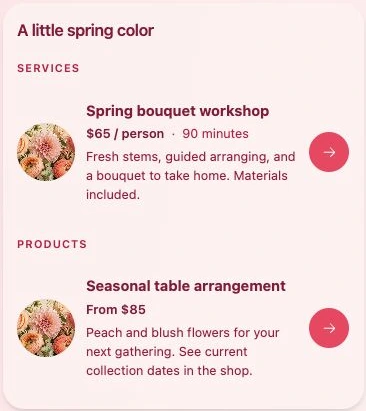
All four layouts support item images. Choose the style that fits your profile.
The details that help someone choose
Your linked service handles bookings, checkout, stock, and digital delivery. The block presents your offer and points visitors to that next step.
Make it yours
Open More sections in your profile editor and choose What you offer. Give the section a title that fits your work.
Choose Service or Product. Add a name, description, optional price, and a duration for services. Add an action label and link when useful.
Check the preview and save your section. Open your profile on a phone, follow the links, then share your profile link or QR code.
Free includes one What you offer section with up to three items per profile. Paid plans give you room for more sections and items.
Yes. Choose Service or Product for each item. You can mix them in one section or group them by type. Services can include a duration.
The action button opens the link you choose. Your booking service or shop handles availability, appointments, checkout, and order confirmation. Displayed price text does not calculate a total or charge a customer.
Add it as a service or product, then describe the package, price, dates, and any conditions. Link to the page where customers can take up the offer. Update or hide the item yourself when it ends; the block does not schedule promotions or apply discount codes.
Yes. Choose Product, explain what the customer receives, and link to your purchase or download page. The linked service handles payment and file delivery.
Yes. Edit the details, reorder items, or turn off Show on my profile for an item you want to hide. Visitors opening your profile will see the current saved content.
Questions about your account, profiles, or billing? Visit the general FAQ.
Bring your services, products, and offers into one business profile. Start with the items people ask about most, and give each one a clear next step.